

Cloud Analysis Policy
Cloud Analysis Policies define how Kubex evaluates cloud workloads and generates optimization recommendations. Policies control the analysis window, utilization thresholds, scaling constraints, Kubernetes reservation targets, and instance selection preferences. These settings determine when Kubex recommends:- Upsizing under-provisioned resources
- Downsizing over-provisioned resources
- Terminating unused instances
- Optimizing scale groups
- Adjusting Kubernetes cluster reservations
- Migrating to more efficient instance families or generations
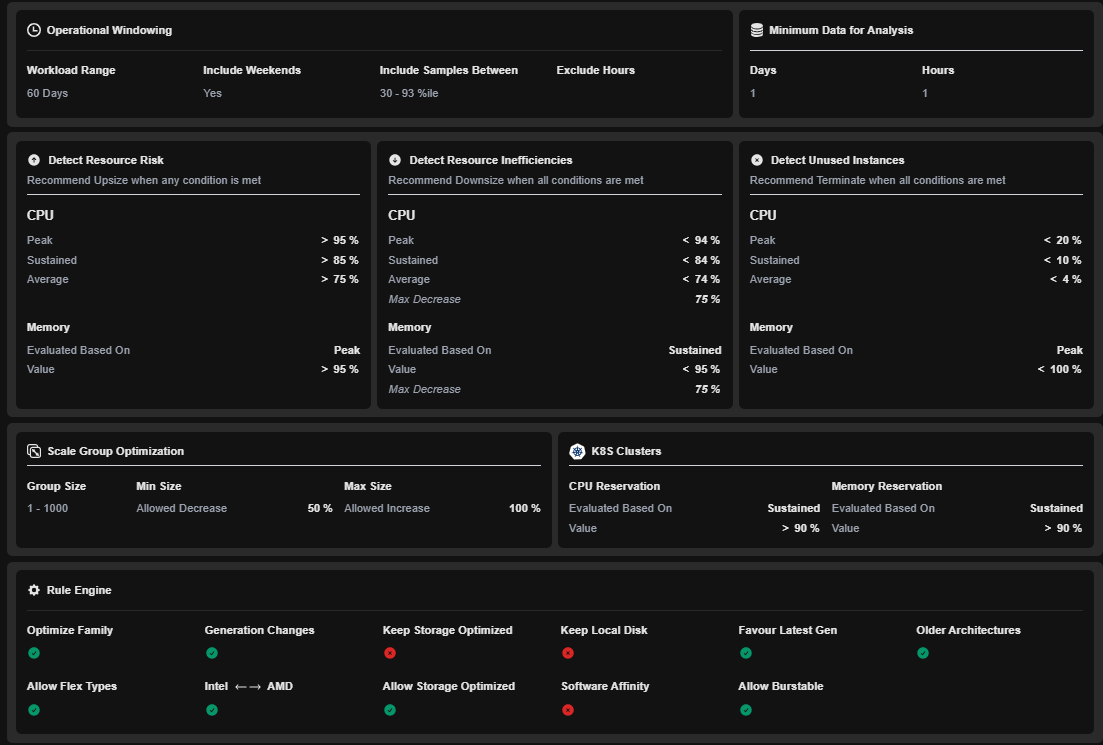
Figure: Cloud Policy
Operational Windowing
The operational window determines which historical utilization data is included during analysis.Configuration Details
Workload Range
Defines the historical period used for workload analysis. Current Setting:60 Days
A longer analysis period captures seasonal trends and workload variability while reducing sensitivity to short-term spikes.
Include Weekends
Determines whether weekend utilization data is included. Current Setting:Yes
Include Samples Between
Filters utilization samples to eliminate statistical outliers. Default Setting:0 - 100th Percentile
Minimum Data Requirement
Kubex requires at least this amount of utilization data before generating recommendations.
Resource Risk Detection
Resource Risk Detection identifies workloads that may be undersized and at risk of performance degradation. Recommendations are generated when any configured threshold is exceeded.CPU Risk Thresholds
Recommendation Logic
Kubex recommends an Upsize when:Memory Risk Thresholds
Recommendation Logic
Kubex recommends an Upsize when:Resource Inefficiency Detection
Resource Inefficiency Detection identifies workloads that are overprovisioned. Recommendations are generated only when all configured conditions are satisfied.CPU Inefficiency Thresholds
Recommendation Logic
Kubex recommends a Downsize when:Memory Inefficiency Thresholds
Recommendation Logic
Kubex evaluates sustained memory utilization and limits reduction recommendations to a maximum 75% decrease.Unused Instance Detection
Unused Instance Detection identifies workloads that can potentially be terminated. Recommendations are generated only when all thresholds are met.CPU Thresholds
Memory Thresholds
Recommendation Logic
Kubex recommends a Terminate action when:Scale Group Optimization
Scale Group Optimization controls how Kubex recommends adjustments for Auto Scaling Groups and similar scaling constructs.Configuration
Recommendation Constraints
Kubex will:- Reduce scale groups by at most 50%
- Increase scale groups by at most 100%
- Analyze groups containing between 1 and 1000 instances
Tying Kubernetes Node Groups to the Scale Groups hosting them
When an AWS ASG or Azure ScaleSet hosts an EKS/AKS cluster, scale group optimization cannot rely on utilization metrics alone. Kubernetes CPU and memory requests must also be included in the analysis. If Kubex is connected to the Kubernetes clusters, it can correlate scale groups with their node groups and produce actionable recommendations.CPU Request
Memory Request
Rule Engine
The Rule Engine controls how Kubex selects target instance types during optimization.Recommendation Summary
With this policy configuration:- Workloads at risk are upsized when CPU or memory utilization exceeds defined thresholds.
- Overprovisioned workloads are downsized based on CPU and memory efficiency rules.
- Nearly idle workloads are flagged for termination.
- Scale groups can shrink by up to 50% or grow by up to 100%.
- Instance recommendations can migrate across families, generations, and CPU vendors to maximize efficiency and cost savings.